How to Make a Faceless YouTube Channel with APOB AI in 2026
Faceless YouTube channels are one of the most practical ways to build an audience and generate income without putting your own face on camera. They've existed for years in niches like finance, history, study music, and tech — but the production bottleneck was always video creation. Either you narrate over stock footage, or you animate something, and both take time and money.
APOB AI changes that equation for one specific format: the AI presenter. Instead of showing stock footage while a voice narrates, you have a consistent AI character on screen — a digital host who delivers the content, looks the same in every video, and costs a fraction of what a real presenter would.
This guide covers everything from channel setup to content strategy to credit costs per video.
Why Faceless YouTube Channels Work
The mechanics are simple. YouTube rewards consistent posting and high audience retention. Faceless formats can deliver both because:
The trade-off is that AI presenter channels don't build the same parasocial connection as a real person on camera. For certain niches (fitness, personal development, lifestyle vlogging), that connection matters. For educational, finance, tech, or niche hobby channels, it matters much less.
How APOB AI Fits Into a Faceless YouTube Workflow
APOB AI's role is generating your on-screen presenter and producing the video content. It doesn't do everything — you still need a script, audio, and basic editing. But it handles the most visually intensive part: creating a consistent, photorealistic AI character that delivers your content.
The workflow looks like this:
- You write a script
- You upload a base image of your AI character and the script to APOB AI
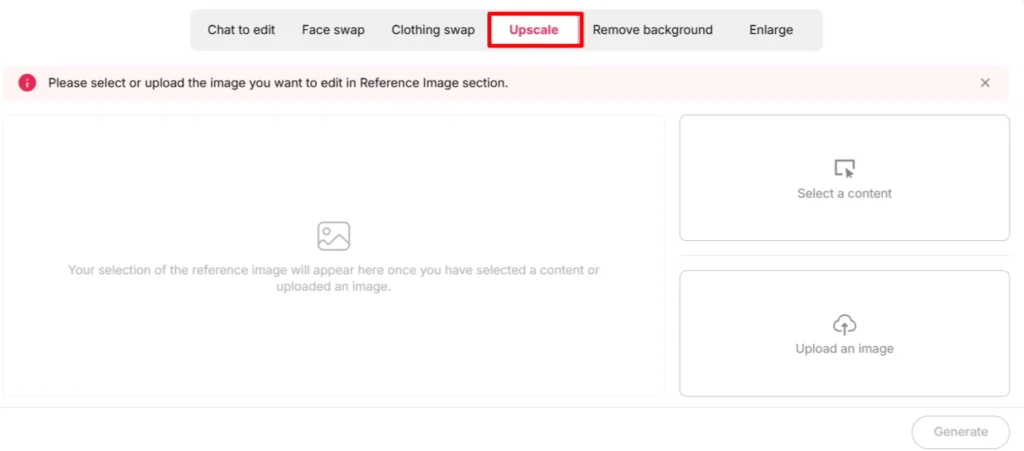
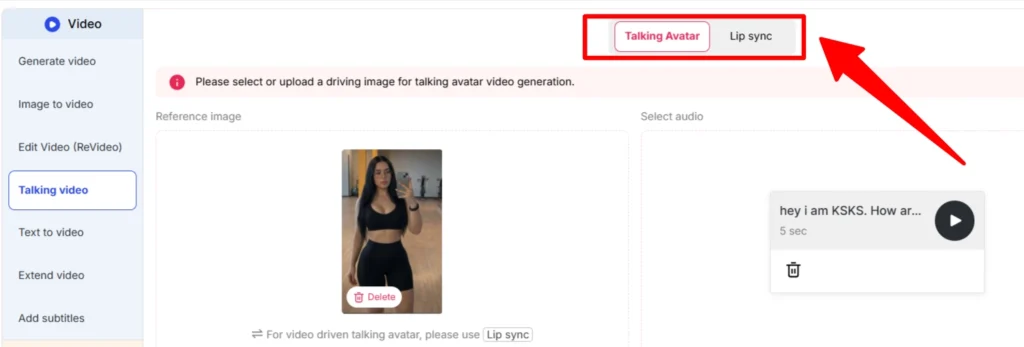
- APOB AI generates a talking avatar video — your character speaking the script with lip sync
- You combine that with B-roll, text overlays, or screen recordings in a basic editor
- You export and upload to YouTube
The APOB AI talking avatar feature is the centerpiece of this workflow. The face swap and image generation features are secondary but useful for thumbnails and channel art.
For the full platform review, see APOB AI Review!
Channel Setup Guide
Before touching APOB AI, get your YouTube channel infrastructure right:
Channel name: Pick something the character could own, not something tied to you personally. Examples: “Zara Explains Finance,” “The Macro Brief,” “NovaTech Reviews.”
Channel art: Use APOB AI to generate your character in a branded setting. A wide-format banner image, a profile picture, and a few thumbnail templates are all you need to start.
Channel description: Write it in the character's voice. This helps with positioning and slightly improves visibility.
Upload schedule: Pick one. Even one video per week is enough to grow a channel if the content quality is consistent. Two per week accelerates growth significantly.
Playlist structure: Create 3-5 playlist categories on day one. This organizes content for new visitors and increases session time.
Creating Your AI Presenter
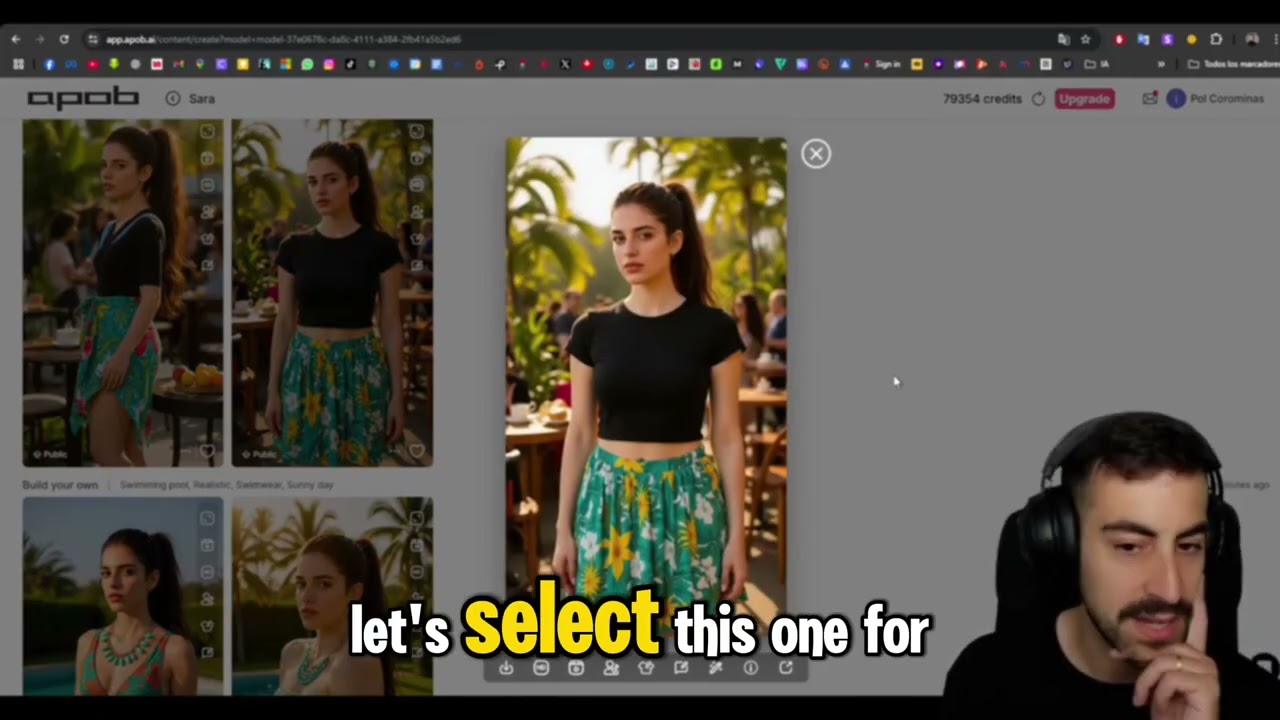
This step is covered in detail in the how to create an AI influencer with APOB AI guide. For YouTube specifically, a few extra considerations apply:
Framing matters more. YouTube thumbnails and video frames are typically mid-shot or close-up. Train your character model with images that work well in those framings — don't rely entirely on full-body shots.
Wardrobe signal. Your character's outfit should signal the niche. Finance channel? Business casual. Tech reviewer? Clean minimalist. Fitness? Athletic wear. The visual signal helps viewers orient instantly.
Neutral backgrounds work better for B-roll integration. If you're going to composite your AI presenter over screen recordings or graphics, generate versions with clean, solid, or blurred backgrounds.
Voice consistency. APOB AI offers multiple voice options for talking avatar videos. Pick one voice for your channel and stick to it. Changing voices between videos damages the illusion of a consistent presenter.
Video Production Workflow
Here's a practical video production workflow for a 5-8 minute YouTube video using APOB AI:
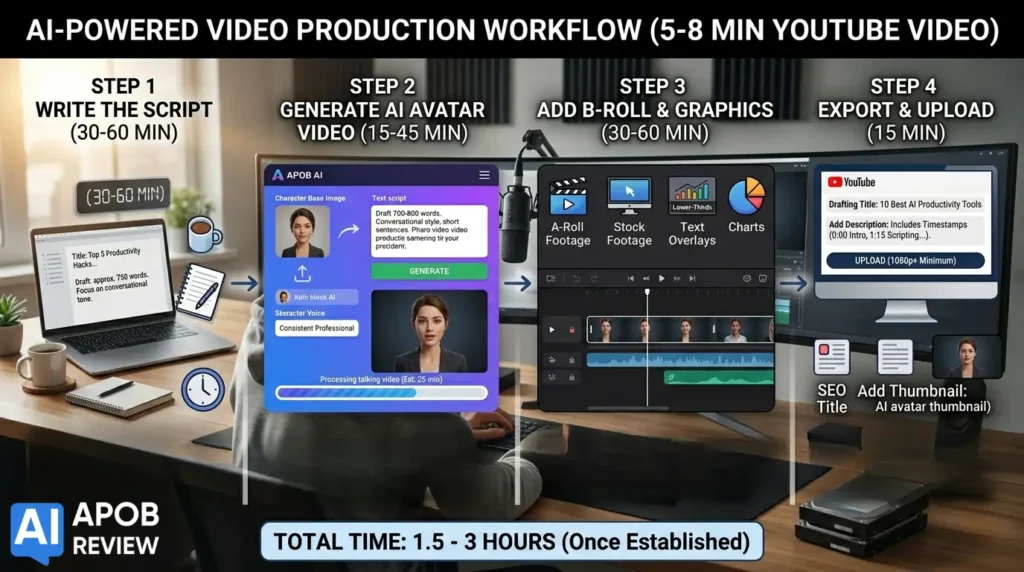
Step 1: Write the script (30-60 min) For a 5-minute video, you need approximately 700-800 words of spoken script. Write in a conversational, direct style. Avoid academic language. Short sentences read better on camera.
Step 2: Generate the talking avatar video (15-45 min including processing) Upload your character base image and paste the script into APOB AI's talking avatar interface. Select your consistent voice. Generate. The processing time varies — budget 15-30 minutes for a 5-minute video.
Step 3: Add B-roll and graphics (30-60 min) Most YouTube videos benefit from supplementary visuals every 15-30 seconds. This might be:
You can cut between your AI presenter and these supplementary visuals using free tools like DaVinci Resolve or CapCut.
Step 4: Export and upload (15 min) Export at 1080p minimum. Write an SEO-optimized title, description with timestamps, and add a thumbnail. Your thumbnail should feature your AI character — generate a specific thumbnail image in APOB AI using the same trained model.
Total time per video: 1.5-3 hours once you have a workflow established.
Content Ideas by Niche
Personal Finance:
Tech Reviews:
Health and Fitness:
Education / How-To:
Business and Side Income:
The affiliate opportunity is obvious here — review and recommendation content in any of these niches can embed affiliate links in the description for platforms, tools, or products your AI presenter mentions.
Monetization Timeline
Let's be realistic about what YouTube channel monetization looks like:
YouTube Partner Program requirements:
Realistic timeline for a faceless AI channel:
Monthly ad revenue at 1,000 subscribers varies wildly by niche. Finance channels can earn $15-$40 CPM. Tech channels $8-$20. General interest $2-$6. Don't build a business plan around YPP revenue in year one — build around affiliate commissions and sponsorship opportunities, which can start much earlier.
Credit Costs Per Video
Here's an approximate credit breakdown for a typical APOB AI-powered YouTube video:
| Component | Approximate Credits |
|---|---|
| Talking avatar video (5 min) | 100-200 credits |
| Thumbnail image generation | 5-10 credits |
| Alternate thumbnail variations | 5-15 credits |
| B-roll character shots (optional) | 10-20 credits |
| Total per video | ~120-245 credits |
On the free plan (2,400 credits/month), you can produce approximately 10-12 videos per month — more than enough for a twice-weekly schedule.
On the Micro plan (6,000 credits/month), that's 25-40 videos. At that volume you're building a real content library fast.
Try APOB AI Free — 80 Credits/Day, No Credit Card
Code: No code needed — free plan via link
Discount: 100% Free forever (80 daily credits, 1 model slot, no watermark)
FAQ: Faceless YouTube Channels with APOB AI
Will YouTube flag or remove AI-generated content?
YouTube's current policy requires disclosure of AI-generated content, particularly in realistic depictions. There's a disclosure toggle in YouTube Studio for AI-generated videos. Use it. As of 2026, YouTube does not ban AI presenter content — they require disclosure, especially in news or realistic scenarios.
Does the free plan have enough credits for a YouTube channel?
Yes. 2,400 credits/month is enough to produce 8-12 videos per month, which exceeds most posting schedules for new channels.
Can I monetize a YouTube channel with an AI influencer through affiliate links?
Yes, starting from day one. Affiliate links in the description don't require any subscriber threshold. See our guide on making money with an AI influencer for strategy.
How realistic is the talking avatar output?
Realistic enough for most educational and review content. The lip sync is convincing at normal viewing speed. Occasional artifacts appear — regenerate those segments rather than publishing them.
Do I need video editing software?
Basic editing is needed to combine the APOB AI output with B-roll and text overlays. CapCut (free), DaVinci Resolve (free), or iMovie (free on Mac) all work well. None require professional editing experience.
What's the minimum plan for a serious YouTube channel?
The free plan is genuinely sufficient for starting out. Upgrade to Micro when you need more than 2,400 credits/month — typically when you're producing more than 10 videos per month or want to build a second character.
Can one person manage multiple AI influencer YouTube channels?
Yes — this is one of the primary use cases for the Macro and Mega plans, which offer 7 and 18 model slots respectively. Each slot can hold a different character for a different channel.